PixelLayer / Chrome Extension
Instant UI inspection, style extraction, and Tailwind conversion inside your browser.
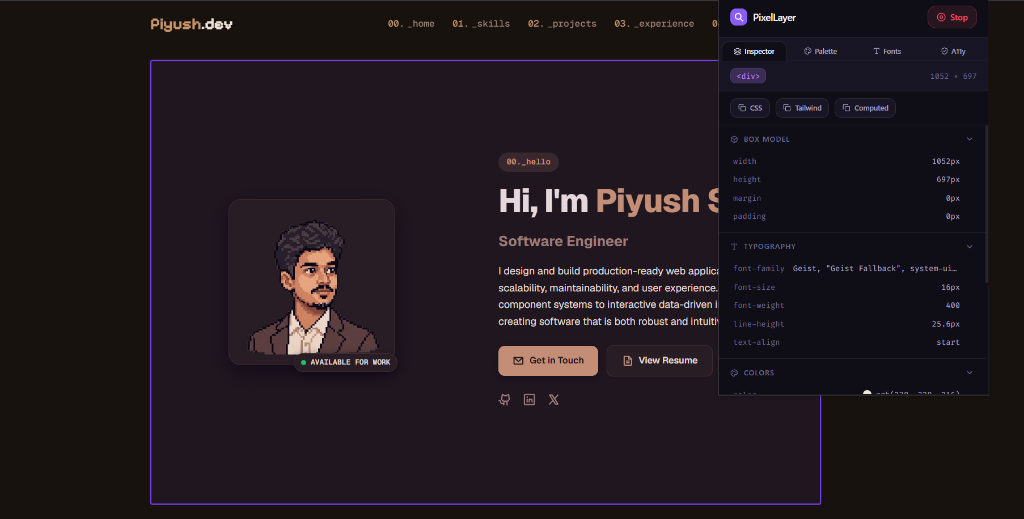
Overview
I created PixelLayer because I got tired of digging through nested Chrome DevTools tabs just to copy a simple padding value, color HEX, or font weight when building or reverse-engineering UI components.
Operating directly inside any browser tab, PixelLayer lets you activate inspection mode with a single click or keyboard shortcut. Hovering over an element highlights it with a visual box, and clicking locks its properties into a clean popup where dimensions, typography, flexbox/grid layout, and computed Tailwind CSS classes can be copied instantly.
Beyond element inspection, PixelLayer provides site-wide design tools: aggregating full color palettes grouped by frequency, inspecting web font variations with live specimens, auditing contrast compliance against WCAG standards, and detecting active host web frameworks.
The Problem
Extracting visual specs from websites using native browser DevTools creates friction: switching repeatedly between Computed, Styles, and Layout panels, manually converting pixel measurements to Tailwind classes, and inspecting dozens of elements individually just to understand a site's color system.
The Solution
I built PixelLayer as a lightweight page content script and React popup extension. Computed styles are organized into clear categories (Box Model, Typography, Colors, Layout, and Visual Effects) with real-time client-side Tailwind class translation, keeping host page performance steady.
Key Features
Hovering over any element displays an instant visual bounding box overlay. Clicking locks the inspection, freezing position coordinates and populating style data into the popup.
Converts an element's computed styles into equivalent Tailwind CSS utility classes in real time, mapping pixel dimensions, font weights, and flex/grid rules automatically.
Scans page elements to aggregate background, text, and border colors grouped and ordered by occurrence frequency, allowing instant HEX color copying.
Identifies active page fonts (system, web, and Google Fonts) and displays active font weight variations alongside a live specimen preview.
Calculates contrast ratios between text and background colors against WCAG compliance thresholds while checking for missing image alt tags and unlabelled buttons.
Scans host page environment signals to detect modern frameworks and styling libraries, displaying active technology badges in the extension header.
Technical Decisions & Architecture
Multi-Entry Vite Build Configuration
Decision: Configured Vite to compile distinct entry points for the background service worker, page content script, and popup UI into a unified build output.
Why: Chrome extensions require isolated entry points without shared code chunks that break extension script loading rules.
Manifest V3 & Storage-Based State Synchronization
Decision: State synchronization between the background worker, content script, and popup UI relies on message passing and local storage rather than persistent in-memory global state.
Why: Manifest V3 background service workers terminate automatically after brief idle periods, causing in-memory state loss.
Custom Rule-Based CSS Translation Engine
Decision: Built a client-side translation engine that maps computed browser CSS properties directly into Tailwind v3 class strings.
Why: Sending computed styles to external APIs would introduce network latency and depend on an active internet connection.
Technical Challenges & Key Learnings
Maintaining Inspector Overlay Performance on Heavy Pages
The Problem: Tracking cursor movements and highlighting elements caused layout slowdowns on pages containing thousands of DOM nodes.
Why it was difficult: Re-extracting full computed styles and updating bounding coordinates on every pixel of cursor movement created noticeable lag during fast hovering.
How it was solved: Built the inspection overlay as a single fixed DOM node attached to the root document, updating only CSS transform position properties without altering page structure. Heavy operations were decoupled from hover events and executed lazily.
Handling Restricted Browser Contexts & Page Script Lifecycles
The Problem: Chrome extensions face strict security boundaries on browser system pages and newly opened tabs where content scripts have not yet run.
Why it was difficult: Sending inspection commands from the popup to uninitialized tabs caused message connection errors and unresponsive extension toggles.
How it was solved: Added a validation layer to the popup runtime. Before sending inspection events, the popup verifies tab permissions and checks content script readiness, dynamically injecting the script if needed.